Tutorial on How to Download Offline Maps on your Smartwatch
We have here a tutorial on how to download offline map on your smartwatch. Meaning you can still track your map trajectory in real-time even without the need to connect your wearable online.
The KKTICK Tank T5 Smartwatch does have 4 GB of storage space where you can download, store maps, and use it offline. You can track your activities, your location with the help of the built-in GPS of the smartwatch.
If you want to know the process on how to download offline maps for your smartwatch, check out the details below.
How to Download Offline Maps on your Smartwatch
- Connect your smartwatch Tank T5 to your PC or Laptop using the transfer/charging cable.
- Set the smartwatch as Storage, and not Charging
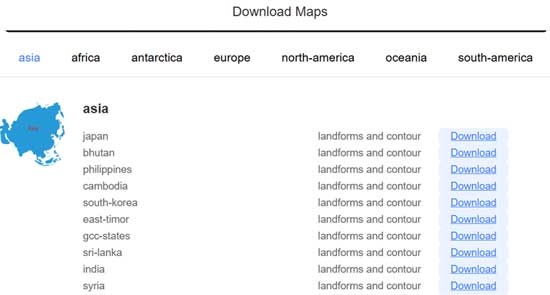
- Open your Browser and go to the link https://www.dt1pro.cn/map/maps.html
- From the list of regions look for the map that you want to download
- Select the link to download the application, depending on the map, it might take several minutes to download a map especially if there are a lot of cities, and location.
- Make sure that you save it in the right location (folder)
- Once the download is complete, unzip the file to extract the content
- There are at least 2 zip files, extract it all. You will have two folders that includes Map
- Copy the two folder, and send it to the smartwatch with the use of transfer cable.
- Remember that the smartwatch is set to storage, you will see in your PC, that the smartwatch is set as a new drive
- Look for the Map folder in the smartwatch and paste the copied folder of the map that you downloaded.
- Now you have an offline map available in your smartwatch
You Might Want to Read: Anywise W1 Pro Smartwatch
Using the Map in the smartwatch
- Open your smartwatch, and go to Offline Map
- Depending on your location the map will be automatically selected, you will see the location arrow, pointing to your location
- There are at least three options for the offline map view, select Landform Map, Contour Map, or Blend Mode.
- You now have an Offline Map in your smartwatch that you can use to track your activities especially for outdoor sports functions.
Features in the Offline Map
- Options to Zoom in and Out
- See the recorded Tracks
- Map Type
- Record your Track
