How to Connect Xiaomi Smartband 10 to Phone (Android) with Mi Fitness
The Xiaomi Smartband 10 is here, and if you have one, it’s time to pair, connect it with the support app Mi Fitness Application. Although pairing it with the support app is easy, there are still some users that are having an issue when pairing the Xiaomi smartband 10 with the Mi Fitness application.
We do have a tutorial below on how to connect your fitness tracker with the Mi Fitness application. See the tutorial below, check out the step by step guide below for pairing.
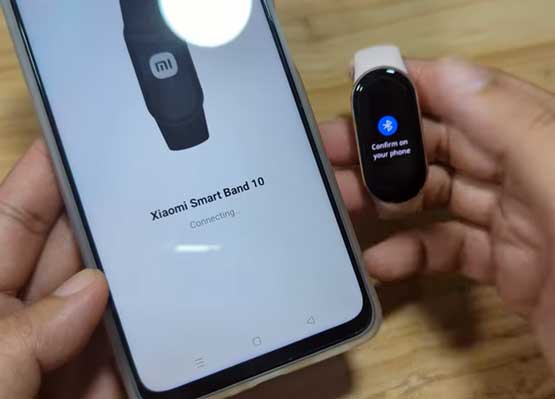
How to Connect Xiaomi Smartband 10 to Phone
- Scan the QR code of Mi Fitness App on user manual or the packaging of the Xiaomi Smartband 10. Or you can just search it on Google Play Store, just type Mi Ftiness app.
- Tap on Install to download the app on your smartphone
- Open the Mi Fitness application, then select Start
- Tap to Agree to User Agreement and Privacy Policy
- Select your Region (please take note that there are some Regions that is not yet supported by this wearable)
- Tap Next to Continue
- You are now on the Dashboard, there are at least 4 menus, Health, Workout, Device, Profile.
- Tap on “Device” to search for your smartwatch
- Select the “Add Device” button
- The Mi Fitness app will ask to activate your Bluetooth connectivity, tap to Agree
- The application will ask for permission to “determine the relative position of nearby devices”. Tap Allow to continue.
- Mi Fintess app will now search for your wearable, if not found, go to Add Model, and select Xiaomi Smart band 10.
- Before you can pair your fitness tracker, Mi Fitness will ask you to register an account before you can continue.
- After registration, you can now pair your wearable.
- Tap the Xiaomi Smartband 10 if found on the search dashboard. There is a notification on the fitness tracker asking you to connect your band to the support app, tap to connect.
You are Now Connected to the App
- Once your band is connected to Mi Fitness App, you can now set some of the options on the wearable.
You Might Want to Read: Kospet Magic R10
- Personalization that you can set for the Xiaomi Smartband 10 with the Mi Fitness App
- Download Watch faces, and set custom watch faces for the band
- Configure Push Notifications, and Call Notifications, such as adding Quick Reply option
- Set Heart rate monitoring options
