How to Change Time Time in Laxasfit Smart watch 24HR to 12 HR
If you have a Laxasfit Smart watch, and you want to change the time of your smartwatch to the current time. The Laxasfit device has an option to change the time of your smartwatch directly or you can sync your device with the support app to follow the time of your smartphone.
Below are the steps on how to setup/change the time of your smartwatch, check out the step by step tutorial.
In the Laxasfit App
24 Hour to 12 Hour
- Open the Laxasfit app, tap on the “Device Settings”. Then toggle on or off for the 24 hour format. Turning it on will activate the 24 hour format in the smartwatch. Just refresh the app to set the time in your smartwatch.
- Synchronize time – use this one if you want to follow the time of your smartphone. You can do this in the settings of your smartphone. Just go to “Device Settings” menu, then select “Synchronize System Time”.
Setting Time in the Smartwatch without the Need to Pair with the Phone
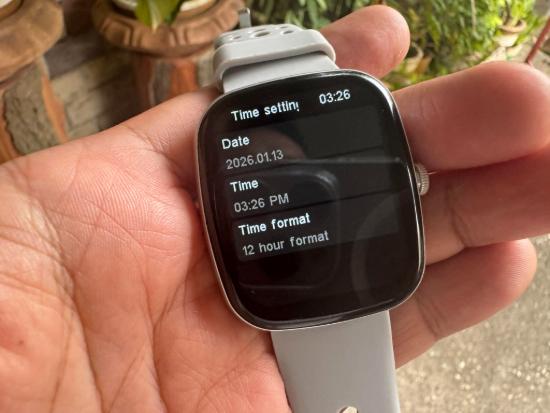
You can change the time in your Laxasfit smart watch without the need of pairing it with your phone. To do this, go to the “Settings” menu, then select “Time Setting” then set the time for your smartwatch. Options are; Date, Time with option to set to PM or AM. Time format, option to set to 12 HR format to 24 Hour format.
You Might Want to Read: Tutorial How to Connect HRYFine Smart watch to Phone 2026 Guide
Setting time in the latest Laxasfit Smart watch is now more easy, early devices that is Laxasfit powered don’t have an option to set, especially the option in the smartwatch. Right now, almost new wearables with Laxasfit app has an option to set the time without the need of synchronization. Link for the App
