Quick Reply on iPhone for Huawei Band 11?
With the popularity of Huawei Band 11 in the fitness tracker category, there are a lot of questions on its different features. So far, one of the best features of the Huawei Band 11 is the smart notifications. With its smart notifications, users can receive messages on the smartband, a paragraph of information, with support for emoji.
Aside from emoji support and a huge number of characters, the fitness tracker also support quick reply, there are predefined quick replies on the support app plus users can also add their own.
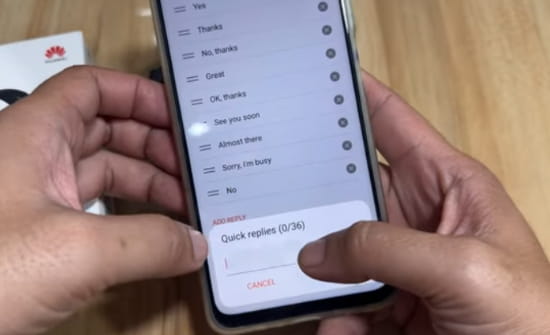
This feature is available on Android smartphone, quick reply features are EMOJI and prefined messages. Users or those who are planning to get the Huawei Band 11, is the quick reply feature available on iOS platform, particularly iPhone devices?
You Might Want to Read: Atmos Drift 2X Smartwatch
Well, unfortunately, this functionality is not available in the smartband, the option to configure the predefined messages is not even available in the support app. If you are expecting that an update may ultimately add this functionality, well with Band 9, as well as Band 10, even with an update we did not see this feature added to the smartband. So with the Band 11, don’t expect that this feature will be included.
How to Set the Quick Reply Feature on the Huawei Band 11 with Android phone?
- Open the Huawei Health app
- Go to “Devices” menu
- Select Huawei Band 11
- Scroll to the middle part of the Dashboard, then select Quick Replies
- There are several preloaded quick replies, you can add your own by selecting “Add Reply”
- Compose your own quick reply, up to 36 character is allowed
Huawei Health App Download Link
